do you manage more than one blog?

Published: Thu, 09/17/15

If you have access to the backend of two or more WordPress blogs than have I got some good news for you!

The folks at Automattic (the people who founded WordPress) recently updated their JetPack plugin to allow access to all of your blogs in one dashboard. Now this applies to WordPress.com and self-hosted WordPress blogs as long as you are using the same login for them.

Here’s more about what you will have access to:

First, login to your Wordpress.com dashboard (you should have one of these already if you are using the JetPack plugin).
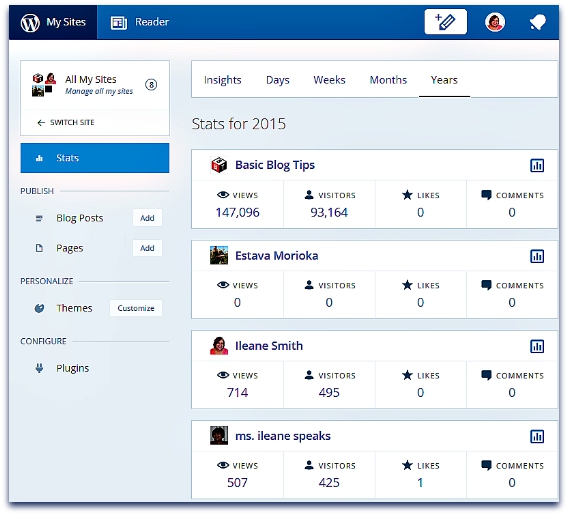
All WordPress Sites

Next, at the top left hand side of the page you will see a link to My Sites. Click there to see all of the blogs you have connected with your login.
 
You’ll be amazed at everything you can do inside this dashboard. For example, you can write new blog posts, check stats, and oh yeah – you can even update any of the plugins that you’ve downloaded from WordPress!! 
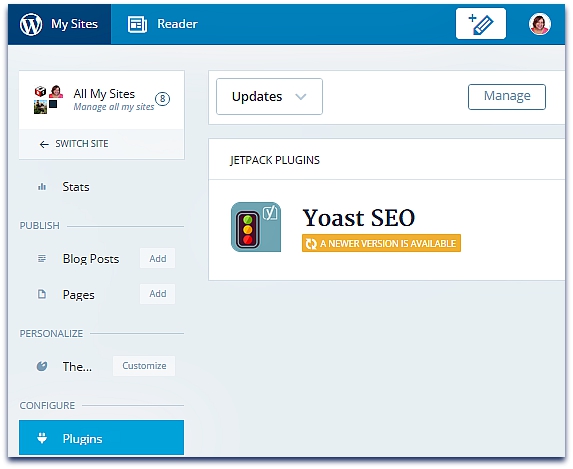
This comes in really handy when a popular plugin like Yoast SEO needs to be updated on all of your blogs.  
Yoast Plugin Updat
Now, go and check it out and come back and let me what other goodies you find. 
I'm loving this new update and I think you will too.

Happy Blogging!

~Ms. Ileane

P.S. Be sure not to miss my YouTube video where I go over the Best mics and webcams to use for your next Periscope or Blab. I got lots of great feedback on it already. Even my good friend and mentor Lisa Irby stopped by to say she picked up a new mic!
You signed up to receive updates on  If you are no longer interested, use the link below to unsubscribe. Thank you!