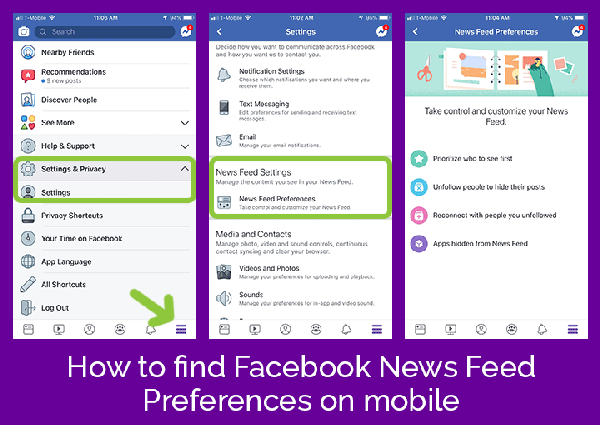
To view your News Feed preferences:
- Click in the top right of Facebook.
- Select Settings and Privacy > Settings > News Feed Settings.
To adjust your News Feed preferences:
- Click See First to make posts from people or Pages appear at the top of your News Feed. Learn about see first.
- Click Unfollow to unfollow a person, Page or group. Learn about unfollowing.
- Click Reconnect to follow a person, Page or group that you unfollowed in the past. Learn about reconnecting.
- Click Snooze to restart, stop or add more time to your snoozes. Learn about snoozing.
Extra Tips: If you friend requested someone and they didn't accept it, DYK that you are automatically following them?!
You can also “teach” Facebook’s Algorithm to stop showing things you don’t want to see so that it will show you what you want to see. This is a bit more manual and tedious but it allows you to curate the best content on your News Feed.